
iPhone Game Mode enhances graphics and reduces controller latency automatically when you launch a game. This optimizes performance to make your iPhone gaming as fantastic as possible.
Game Mode also reduces the background activities and services running on your phone. Luckily, if you don’t want that to happen, you can turn off Game Mode from your iPhone’s Control Center.
Here’s everything you need to know about how Game Mode works.
How to use Game Mode on iPhone
Screenshot: D. Griffin Jones/Cult of Mac
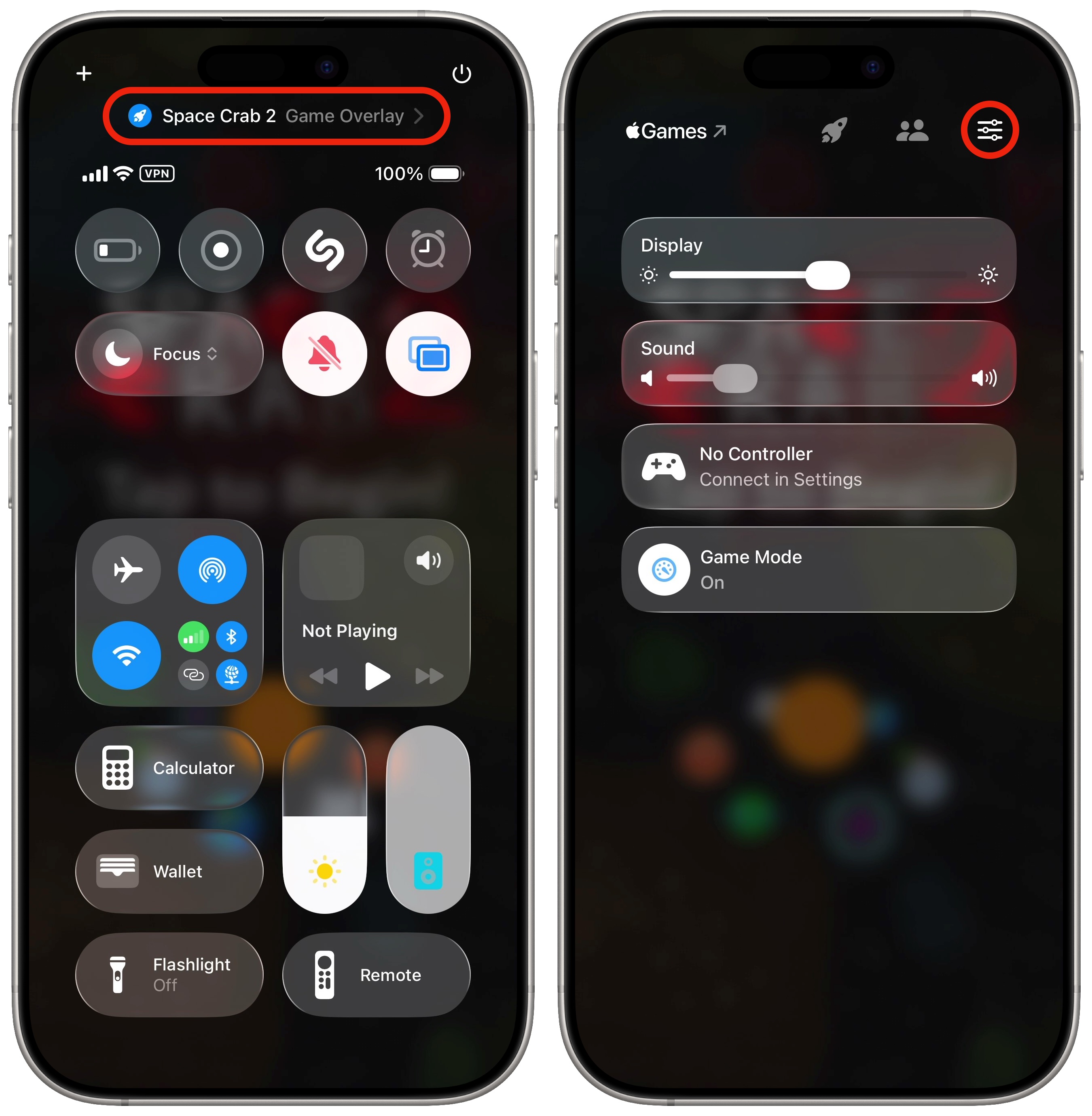
Launching any game for the first time will activate the iPhone’s Game Mode automatically. You’ll see a banner pop down from the top of the screen. You have a moment to tap on it if you want to disable Game Mode.
As described by Apple, “When Game Mode is on, background activity is reduced to optimize the performance of this game.” This may enhance the frame rate, graphics or speed of the game. It also reduces the latency of Bluetooth devices, so game controllers will receive faster input and AirPods will sound more responsive.
Turn off Game Mode
In my testing, even certain simple 2D games like Zookeeper DX and Space Crab 2 will activate automatically in the iPhone’s Game Mode — just like Asphalt 8, a realistic 3D racing game that actually requires more processing power.
If you don’t want to limit your iPhone’s background resources — like, for instance, if the game you’re playing isn’t actually pushing the system that hard — you can disable Game Mode. To do so, access your iPhone’s Control Center by swiping down from the top right corner of the display (or, on older devices, swiping up from the bottom). Tap the line of text at the top of the screen and tap the Game Mode button to turn it off.
More advanced iPhone features
- You can edit the buttons in Control Center. Add many more toggles and buttons, including those from third-party apps. You can resize some buttons to make them more prominent, and you can arrange your controls across multiple pages. In one fluid motion, you can swipe down to activate Control Center and continue swiping down to scroll through your pages.
- StandBy mode turns your phone into a smart display when it’s sitting on your desk, your nightstand or the kitchen counter.
- Change out your iPhone’s Lock Screen buttons from the standard Flashlight and Camera to whatever you want. There’s a giant selection of buttons you can swap in their place.
- You can create Focus modes to customize notification settings for different times of day, like work, vacation, driving and personal time.
- Customize your iPhone’s Action button to toggle the flashlight, open the camera, run a custom shortcut and more.
- Hide and lock apps with Face ID (or Touch ID) so they can’t be opened (or seen on your phone) by anyone else.
We originally published this article on iPhone Game Mode on August 22, 2024. We updated it with the latest information on September 16, 2024, and April 17, 2026.

D. Griffin Jones is a writer, podcaster and video producer for Cult of Mac. Griffin has been a passionate computer enthusiast since 2002, when he got his first PC — but since getting a Mac in 2008, he hasn’t turned back. His skills in graphic and web design, along with video and podcast editing, are self-taught over 20+ years. Griffin has a bachelor’s degree in computer science and has written several (unpublished) apps for Mac and iOS. His collection of old computers is made up of 40+ desktops, laptops, PDAs and devices, dating back to the early ’80s. He brings all of these creative and technical skills, along with a deep knowledge of Apple history, into his work for Cult of Mac.

